
Download 3D Pixel Art Creator APK – 3D Pixel Art Editor, Android, Free, Creative Tool
Overview
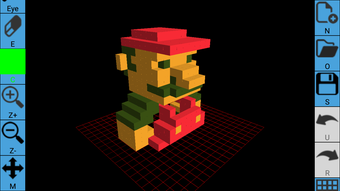
3D Pixel Art Creator is a free Android application developed by EASY GAME, designed for users interested in creating 3D pixel block characters. The app serves as a creative tool for digital art enthusiasts and hobbyists who enjoy pixel art and character design. It enables users to generate personalized avatars using either a photo import or the device’s camera, making it accessible even to beginners.
The core purpose of the software is to simplify the process of crafting stylized 3D pixel characters with customizable features such as hairstyles, clothing, accessories, skin tone, and gender. These characters can be animated with basic movements, blinking, and facial expressions, adding a dynamic layer to the creative output. Users can also set backgrounds and colors, allowing for context-specific designs.
The app supports exporting creations as images or videos, facilitating sharing via email or online platforms. It is particularly suited for content creators, gamers, and casual artists looking for a lightweight, intuitive way to express individuality through pixel art. The software is available exclusively on Google Play, emphasizing its accessibility to Android users worldwide.
Key Features & Capabilities
- Character Creation from Image or Camera – Users can import a personal photo or use the device’s camera to generate a base character, enabling quick and personalized avatar creation.
- Extensive Customization Options – The app allows adjustments to hairstyles, hats, shirts, pants, accessories, skin color, and gender, offering broad creative flexibility.
- Basic Animation Tools – Characters can be animated with movements, blinking, and facial expression changes, enhancing visual appeal and engagement.
- Background and Color Customization – Users can add or modify backgrounds and background colors to suit different themes or settings.
- Export and Sharing Features – Creations can be saved as images or videos and shared via email or uploaded to websites, supporting social and creative collaboration.
These features collectively support real-world use cases such as designing avatars for online games, creating profile pictures, generating content for social media, or crafting personalized digital gifts. The intuitive interface ensures that even users with minimal artistic experience can produce visually appealing results. The app’s focus on simplicity and fun makes it ideal for casual users seeking a creative outlet without the complexity of professional animation software.
User Interface, Workflow & Performance
The application is designed with a user-friendly interface, prioritizing ease of navigation and accessibility for beginners. The workflow follows a logical sequence: import or capture a photo, customize the character, animate basic expressions, set the background, and export the final output. Navigation is likely structured through a series of intuitive menus and touch-based controls, minimizing the learning curve.
While specific performance data such as CPU or RAM usage was not provided, the app is described as lightweight and suitable for mobile devices. The developer did not specify resource usage details, so actual performance may vary depending on device hardware and Android version. Stability and responsiveness are expected to be consistent with standard Android apps of similar scope.
Users can anticipate smooth operation during the creation process, though complex animations or high-resolution exports may impact performance on lower-end devices. Overall, the workflow is streamlined to maintain user engagement and minimize friction in the creative process.
Compatibility & System Requirements
3D Pixel Art Creator is designed for Android devices and is available for download on Google Play. The application is compatible with Android operating systems, though the specific version requirements were not listed. The installation size is not specified, but the app is described as free and lightweight, suggesting moderate storage usage.
The developer did not provide detailed hardware requirements, so users should ensure their device supports the latest Android updates and has sufficient storage space for app installation and media storage. Compatibility information was partially provided, and users are advised to check their device specifications before downloading. The app is optimized for touch-based interaction, making it ideal for smartphones and tablets with responsive screens.
Pros and Cons
Pros
- Free to download and use with no hidden costs
- Intuitive interface suitable for beginners and casual users
- Supports both photo import and real-time camera capture
- Offers extensive customization for clothing, accessories, and appearance
- Includes basic animation features for movement and facial expressions
- Allows export as image or video for sharing across platforms
Cons
- Exact system requirements and performance specifications were not provided
- Limited to Android platform; no support for Windows, Mac, or iOS
- Animation capabilities are basic and may lack advanced controls
- No mention of cloud storage or project saving features
- Export quality and resolution details were not specified
FAQ Section
Is 3D Pixel Art Creator available for iOS devices?
The app is currently available only on Android through Google Play. There is no information indicating support for iOS platforms.
Can I use the app offline?
Yes, the app does not require an internet connection to create or customize characters. However, sharing via email or uploading to websites may require online access.
Is the app safe to download?
As the app is distributed through Google Play, it undergoes standard security checks. Users are advised to download only from official sources to ensure safety.
Does the app support saving projects for later editing?
The developer did not specify whether project files can be saved locally or stored for future use. It is recommended to export final versions to preserve creations.
Are there in-app purchases or ads?
The app is described as free-to-play with no mention of in-app purchases or advertisements. However, this may change over time, so users should monitor the app’s permissions and behavior after installation.
Final Thoughts
3D Pixel Art Creator stands out as a fun, accessible tool for Android users interested in creating personalized 3D pixel characters. Its combination of image-based avatar generation, rich customization, and basic animation makes it a compelling choice for casual artists, gamers, and social media creators. While the app lacks advanced features and detailed technical specifications, its simplicity and focus on creativity deliver a satisfying user experience.
The absence of pricing, ads, or in-app purchases enhances its appeal as a free creative utility. For those seeking a lightweight, enjoyable way to express themselves through pixel art on mobile, this app offers a practical and engaging solution. Download 3D Pixel Art Creator now and start building your unique digital identity.






.png)
